How To Tell A Story in Social Media
Tell your story as a movie. Connect with your audience
A Practical Framework for Reels, Webinars, Podcasts & VSLs
Why Storytelling Works
Whether you're watching a movie, reading a book, or scrolling TikTok, our brains are wired to respond to stories.
It’s not just entertainment—it’s how humans connect, remember, and take action.
That’s why when you use storytelling—even in a 45-second short—it immediately boosts:
Viewer retention
Emotional connection
Watch how one of our top-performing coaches framed a story using this formula to create an attention-grabbing story that went viral in a day with over 2.2 million views.
When editing, make sure you are identifying these stories, especially if you’re extracting moments from a webinar or podcast
Hook (aka Inciting Incident)
First 1–3 seconds of the video
Must stop the scroll: ask a question, show a bold visual, say something relatable or shocking
Example:
“You’re not losing weight because you’re eating too little—not too much..”
“Cravings? That’s not hunger—it’s imbalance.”
A strong hook creates curiosity and emotional connection fast.
Value (aka Rising Action to Climax)
This is the core message or transformation
Deliver insight, a relatable story, tip, or moment of conflict
Cut the fluff. Use rising tension and pacing to keep people watching
Conclusion (aka Climax → Resolution)
Wrap it up with a takeaway or CTA
Can be inspirational, reflective, or directive
Example:
“Slow down, chew, breathe. Your gut isn’t broken—it just needs a break.”

🎥 The 3-Part Framework for Short Videos
This is your cheat code. Every high-performing video has these 3 stages:
Need help using AI? Fill out this form and we’ll send you the exact prompt we use with our full-time clients.
Tips To Tell Better Stories
Start With the End in Mind
Before you hit record, ask yourself:
What do I want the viewer to feel or do by the end?
What’s the transformation, insight, or shift I want to leave them with?
Where does this story need to take them?
🎯 “When you know where you’re going, your story can lead people there on purpose.”
Storytelling Is Like a Workout
You don’t just walk into a gym and move randomly. You have structure:
Warm-up → Challenge → Burnout → Cool down
That’s your story arc. Don’t freestyle your content—plan the flow.
Real Life Isn’t Linear, Neither should your videos
While you’re recording a podcast, webinar or even a short video, inspiration comes as you hit the record button, that’s part of how the magic of editing happens. Don’t feel pressured to tell a perfect story while recording, your editors should be trained to discover those moments and piece them together as a puzzle to tell a compelling story
Power of Non-Linear Editing
You don’t have to tell your story in the order it happened, your editor just needs to:
Start with the emotional anchor (hook)
Jump to the struggle or context (value)
Then land the point (conclusion)
🧠 Same footage, different order = way better story.
Implementation Tips
Think in clips: every podcast, live, or webinar has multiple micro-stories you can extract
Use strong titles and first lines that reflect the hook
Always ask: What’s the point of this clip?
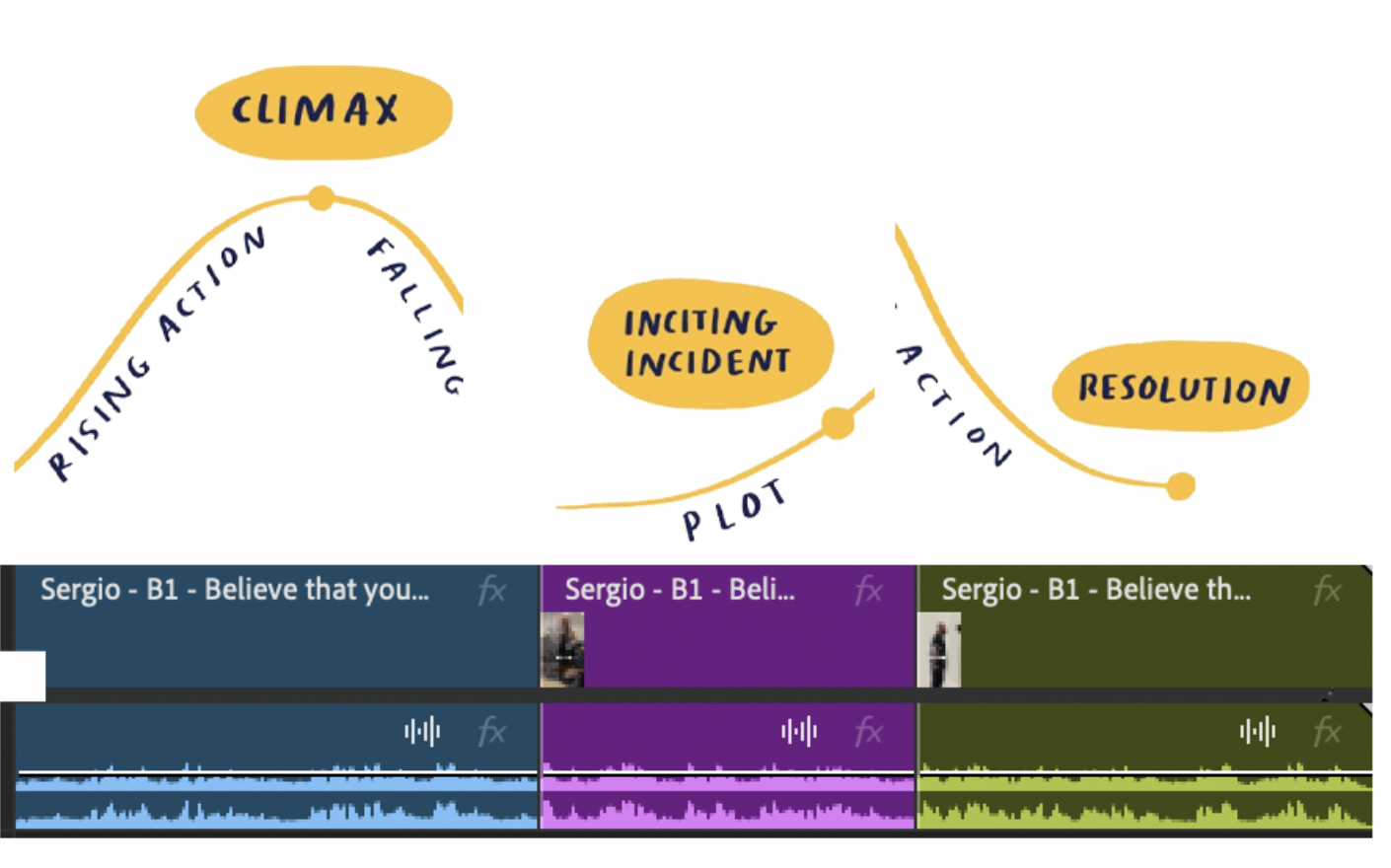

By using Non-Linear Editing, we can take the exact same raw clip, rearrange key moments, and craft a story that’s clearer and more engaging.
It’s all about understanding the strongest starting point. Instead of following the natural timeline of the footage, we shift scenes around to hook the viewer earlier and keep their attention.
Take this example: in one of our clients’ podcasts, a guest begins sharing a personal memory. But she starts by saying, “asking her” — with no context on who “her” is. It’s not an attention-grabbing start. By simply moving that piece of the clip later and leading with a more compelling part of the story, we created a version that’s easier to follow and far more entertaining.
Before
After
By learning how to tell stories and get your message across — and most importantly, how to edit those stories — you’ll start creating content that actually resonates. Life isn’t linear, and neither are your recordings. That’s why editing matters just as much as filming.
Follow the steps in this guide and you’ll start producing clips that are more compelling, more structured, and more valuable to your audience. You’ll learn how to piece your videos together in a way that tells a story — and how to use supporting elements like text, photos, b-roll, and music to reinforce your message.
As you edit, always come back to this core storytelling structure. It’s the foundation for powerful content.
Any Questions?
-
No, we will recommend best practices to optimize your organic or paid reach but will not guarantee views as it’s dependent upon your strategy and outreach.
-
Yes, you can increase your hours on batches of 10 weekly hours.
You’ll get invoiced based on the hourly rate of your active package. -
We recommend looking for a per-project independent contractor. Fiverr or Upwork are great resources for this.
-
No worries! All packages include unlimited revisions. Just remember, revisions count toward your booked hours.
-
We work exclusively with agencies, business owners, coaches, and educational institutes that create content for marketing, their own social media or internal use. We do not work with individual content creators.
-
We cover all editing software, music, B-roll, assets, and tools for project management and revisions.
If you need specific software, fonts, or assets, those will need to be provided by you.